Now that eSnips keeps on evolving new methods to prevent users from downloading, users' frustration is surmounting with each day.
A few days back they changed their default music player and when I made small modifications to my eSnips Downloader it stopped working with Firefox. Internet Explorer users were spared though.
As I am trying to keep pace with eSnips with every step they take, I have tried yet again to modify the code of the Downloader.
This time it would be anonymous downloading through a proxy server. This is not a permanent solution though but as I said before, I am keeping pace with eSnips everday and every time.
Some self explanatory screenshots of the all new eSnips Downloader (Link Generator) :
With Internet Explorer :
Step One : Generate your link as before and click on the generated link.
Step Two : Depending upon the security settings of Internet Explorer - it's a small piece of caution that you are about to download a file from some alien territory - right click on the message below the title bar of the Downloader and choose 'download file', or you may click the bold orange coloured link itself in the main window.
Step Three : Save your file.
With Firefox it's lot easier. The first and the third steps are the same as in Internet Explorer. There is no warning of downloading an unkown file.
I am not very sure if this will work forever. Why, it may stop working a few hours from now.
P.S : I have not tried it, but this new code could byepass the bandwidth problem too. Now, this surely means being 'eSnips-eccentric'...
As eSnips has changed it's default music player from windows media player to a flash player, old download tricks have stopped working.
Although the doc to nsdoc trick still works with downloaders like Flashget and Orbit (Grab++), it isn't working when the URL is changed in the address bar of the browser itself and by pressing Enter. Only a blank page will appear when done so.
To let users continue downloading from eSnips without taking the pains of modifying each URL, I have rewritten the code of the eSnips Downloader (Link Generator). Find the link in the sidebar. It allows you to download as before. You can click on the generated link, or if you like, save the file by right clicking the link and save target as...
But the bandwidth problem still persists. eSnips is not the same place as it used to be before. As for me, I have stopped uploading more to my music folders.
Meanwhile continue downloading files from accounts that have no bandwidth problems (those with less visitors).
These days eSnips seems to be getting paranoid about letting users to both upload and download music files (mp3 in particular, as other formats are still left untouched). Everytime you attempt to play a music file you more often than not, will get a message :
Maximum daily bandwidth exceeded
The maximum daily bandwidth for this account has been reached. Please try to download this file another day.
Thank you, The eSnips Team.
The next day you will probably see the same message (I've been trying to download a file from an user's folder for the last ten days and getting this same message again and again and everyday). I have not been able to find a way out for this problem till today.... but I'm trying.
When you try to upload a music file (try recording a sound file of your own voice and uploading it) you invariably will be refused to upload it (publish it, as people at eSnips call it) citing copyright infringement laws, but only when the file has almost uploaded fully and not at the beginning when the upload starts.
This could be very frustrating for many of us. Imagine an user uploading a 50 MB file and tearing his hair when he gets this message, only after the upload is almost done. However, there are ways to circumvent these glitches as eSnips is presumably using a software called 'Audible Magic' which scans each music file for copyright fingerprints. However, even my not-so-techy mind knows, these fingerprints are embedded in the mp3 file in the form of ID3 tags either in beginning of the file or at the end of it. Try trimming the mp3 a few seconds at the beginning and a couple of seconds at the end, and if luck is on your side you may probably hoodwink the software in letting you upload.
Recently I was searching a Ravi Shankar file at eSnips and I got as far as finding the file with all the details of it (file size, no. of views and all) intact :
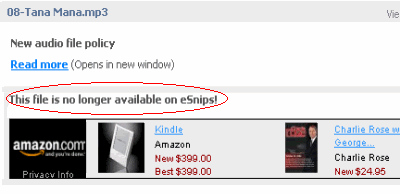
But on attempting to play the file I got this :
This file is no longer available on eSnips!
Well, my abnormally inquisitive mind told me that the file was there at eSnips allright, as even the file size was showing, so I just modified the 'doc' to 'nsdoc' in the address bar and pressed 'Enter'. Lo and behold my file was ready for download.
I am sure something is bugging eSnips which I fail to understand (maybe copyright authorities have tightened their noose around it). But why employ such methods to block files, which are so easy to exploit.
Problems galore persist at eSnips. The whole of December has passed away with users facing one problem or the other, many facing the dilemma of whether to move away from eSnips and search for greener pastures. A recent happening at eSnips : users' files are dying a slow death the 'poison' still being unknown. Everyday friends at eSnips are reporting that files are being removed or blocked indiscriminately without any logic or reason given.
Suppose I have uploaded a full album of an artist, I find only a couple of the songs being removed or blocked, whereas others are playing as before. So there are are no copyright issues I suppose. eSnips should inform individuals and point out the files which are a cause of concern to them. Let users remove the files themselves or take the risk of their accounts being banned or cancelled.
One more discovery I have made (eSnips is proving itself to be an interesting maze puzzle, at the cost of being laughed at later on), if your file is still showing in your folders and only gives an error when you attempt to play it, you can still salvage it. Just move such files to any of your private folders and you will find that they are still there, playing as before but better be quick in doing this and don't share them for the time being.
I for myself am worried because my music files belong to a dying genre of music and is going through a 'renaissance' period. Today's younger generation is being drawn towards it after a gap of almost 50 years. The whole of 60's, 70's, 80's and 90's were the decades when Hindi film music ruled the roost and hindustani classical music was a word alien to the younger generation. Some of the artists which I have featured are no more in this world and let me say no longer remembered (no copyright issues here atleast). Many others are very young and are quite happy to find their music doing the rounds on the internet. In fact some of them have even contacted me personally and showed their pleasure after knowing that their music is being lapped up (read loved) by the new generation of hindustani classical music lovers.
Now a little about my eSnips Downloader. It's been there all along since 15th of December in the links section of the sidebar of this blog, (must admit I spent quite a few sleepless nights until I finished upon it... ) but many of my visitors failed to notice it and continued to pay their attention only on the tips & tricks of downloading at eSnips. This eSnips Downloader is the easiest thing to use...no install required or anything of that sort. Just a click of the mouse and you are done. As I am not a techie or a software professional I have tried my best to make it simple and easy to use. A few of you who have been complaining their music opening up in a player instead of dowloading will find this very useful because I have added an extra piece of code forcing the file to download and not play.
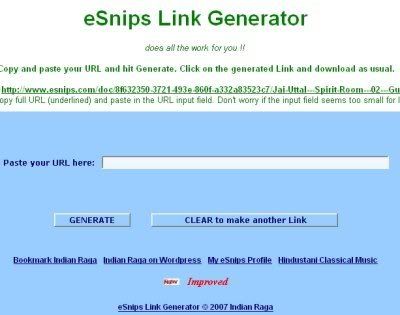
I admit, I am a very laid back person and have not done much effort to publicise it. See some screenshots of the eSnips Downloader at work :
Before :
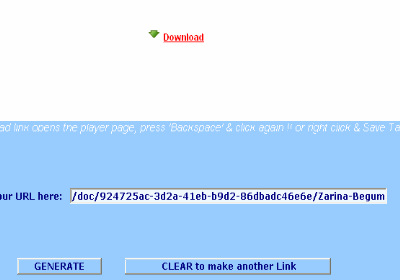
And after the download link is generated :
I hope all of you who find this useful will continue appreciating my efforts (please keep in mind that I have very limited knowledge of software, HTML or javascript).
Since yesterday I have been flooded with queries about the missing 'download' button and an easy way to dupe eSnips into letting all users to download mp3 files freely. I posted a few tips & tricks to download music files, button or no button. After posting these tips I was still uncertain whether all users would go as far as searching the Cache of Internet Explorer or even downloading Flashget and follow the instructions given in the post.
As most of us are not techies or for that matter even computer savvy, I pursued in my quest to find an easier way out and make things easier for fellow eSnippers. At last I discovered a big security lapse at the eSnips server.
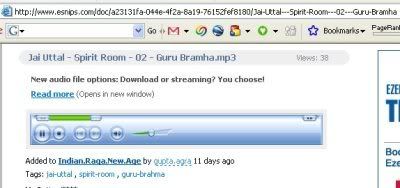
Now as you open an user's music folder you need to click on the music file you want to play. I presume that most of you want that file to play in a new window but many of you just click the link and the player opens up in the same window. In both the cases the window will look like the image given below :
As you can see the URL in the Internet Explorer or Firefox address bar looks like this :
Now click your mouse in the address bar itself and change doc (after http://www.esnips.com/) to nsdoc and remove the name of the file (including the slash), in this case : /Jai-Uttal---Spirit-Room---02---Guru-Bramha. Your modified URL in the address bar will now look like this (you may check out this trick by clicking on the following URL ):
Now just press Enter. Lo and behold your file is ready for download. No need for downloading Flashget or searching fervently for your needed file in the ever bloated Internet Explorer Cache.
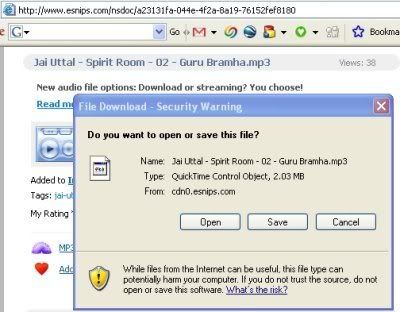
You will see this window after you press Enter :
This window will inadvertently remind you of the good-old-days of the green download button and may drive you to nostalgia. Just click on Save and watch your mp3 being downloaded as before.
Good old downloading days are here again .... till eSnips catches up with this too.
Listen to this same song while you watch your file being downloaded :
P.S : For those who are still experiencing problem in downloading (mainly those who are complaining about their files opening in an embedded player), I have hurriedly made a 'eSnips Downloader' that does all the work for you. See link in the side bar.
From Dec 1, 2007, eSnips, which was fast gaining popularity among music communities because it offered huge 5 GB of storage space for free and allowed users to download mp3 files from each other, has now removed it's now famous green 'Download' button. As of now, one can only listen to a streaming mp3 but would not be able to download it.
But there's still hope unless someone from eSnips catches with it. Although eSnips has given an option to all those who upload mp3 files, if or not they want to share their music with other eSnippers, through the 'edit details' settings, but this was not working till yesterday, atleast not with files which were uploaded before 1st Dec 2007.
For those of you who download a few files and are not into bulk downloads its not a big problem. Play the file you want till the end. Open your windows explorer > documents and settings > user folder (computer user's name) > local settings > temporary internet files. You will find your wanted file in the Internet Explorer cache, though with a different name something like this :
?id=1196684437204 : you can detect the file by its icon (winamp or any other mp3 program icon) and filesize. Copy the file to the folder of your choice and rename it to it's original name. A piece of advice before you venture out to follow this tip: Delete all the Temporary Internet Files of Internet Explorer completely. You may do this by clicking on Tools option of the Internet Explorer > Internet Options > Temporary Internet Files > Delete Files. After clearing the files it would be lot easier for you to find that saved file otherwise finding a particular file from the Cache could be as hectic as finding a pin in a haystack.
The other trick particularly for those of you who download music files more often from eSnips, is to first install Flashget (Download Manager). It's free and is one of the best piece of software in it's category and you will not be able to do without it once you use it. You can download the English version from here :
After installing Flashget normally, start it and minimize it. It will be visible in your system tray though.
Now start playing the eSnips mp3 file which you want to download. Click on the player once. Right click > Properties. Copy the 'Location' of the file, which should be looking something like this :
There must be a ...../?id=(numbers) part in the location of the file.
As you copy the Location by selecting it with the mouse and right clicking on it and then copying, Flashget will automatically copy that URL in its window and you just have to click on the OK button and start downloading this file. If the window does not open by itself, maximize Flashget, click Edit option on the menu, select Paste URL. A window will open and your copied url will be already there, you just have to click on the OK button.
It is not necessary to play the full eSnips file. You play it for a few seconds, copy the file Location (URL) and start playing another music file and repeating the same. This way you may copy the download URLs of multiple files and download them later at your convenience. However there is a glitch here. The eSnips server does not have 'resume' capability for file downloads. So you have to download each file in one go without interrupting i.e. without stopping or pausing. However if your internet connection breaks or you have paused the download by mistake, you'll have to start allover again.
I hope these small download tips will bring smiles on all those eSnippers who thought that the world has come to an end after eSnips removed the 'download' button. Keep smiling and download as much as you can .... till eSnips people catch up with this.
I came to know Kabir Altaf accidently. I was searching for the present state of hindustani classical music in Pakistan on the internet and I found a few sound clips. When I first heard Kabir sing a Meera bhajan Badal Dekh Daree, I imagined him to be an old and seasoned singer of the past era. But how wrong I was.
A few days after I uploaded these sound clips on my Hindustani.Classical.Music folder at eSnips, I received a message from Kabir himself telling me how happy he was to find those clips on the internet. He is a mere 21 years of age and a student in the U.S. and he is still learning classical music. I was quite taken aback at knowing about his young age and such maturity in his voice. Only one other singer I know, has such a voice quality at an young age, who also had surprised me earlier. That is Moumita Mitra about whom I have written earlier.
Kabir Altaf was born in Karachi, Pakistan on February 3, 1986. At the age of 6, he moved with his family to the United States, where he grew up. Kabir has been learning Hindustani Classical Vocal from Ustad Hamid Hossain (based in Baltimore, Maryland) ever since he was ten years old. He has won several prizes at the Annual Indian Music and Dance Competition hosted by the Academy of Indian Music and Fine Arts and the University of Maryland-Baltimore County.
Kabir is currently a student at The George Washington University in Washington DC, where he is majoring in Music (Western Classical Vocal) and Dramatic Literature. He hopes to have a career that revolves around the performing arts, either as a professional musician or in arts-management.
Listen to this Meera Bhajan by him which he has sung with the maturity of a seasoned artist :
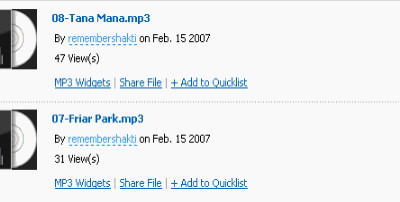
I am fortunate enough to have collected a large number of hindustani classical music songs over a period of couple of years. I have uploaded some in my eSnips folder :
I am no expert of classical music nor do I understand the intricacies and technicalities of such music but still I am fascinated by it. My eSnips folder is a tribute to all those young artists who have chosen to sing this genre of music inspite of better financial and glamourous lure of playback singing in the film world. Only an absolute dedication and love for their art has prevented them from swaying to the 'other' side.
I have included about 150 artists, some of them are very young and relatively less known but in no way less talented. I am also very happy to tell you all, that this eSnips folder has attained Google Page Ranking of 3 within two months. This blog too has a 2 ranking and my other blog Indian Raga at Wordpress has a Google Ranking of 4. Both these were created about the same time as my eSnips folder. This just proves that hindustani classical music is becoming more popular than ever before.
Hindustani Classical Music artists included in my eSnips folders are :
Adnan Sami (Piano)
Ajay Pohankar
Ajoy Chakrabarty
Ali Akbar Khan
Amelia Cuni
Amjad Ali Khan
Anita Sen
Anoushka Shankar
Anup Jalota
Anuradha Kuber
Arati Ankalikar
Ashiq Ali Khan
Ashwini Bhide
Bade Ghulam Ali Khan
Badar-uz-Zaman
Barkat Ali Khan
Begum Akhtar
Bhimsen Joshi
Bismillah Khan
C R Vyas
Chandrakantha
Channulal Mishra
Chitra Singh
D V Paluskar
Devki Pandit
Dilraj Kaur
Dilshad Khan
Dinkar Kaikini
Farida Khanum
Fateh Ali Khan (Patiala Gharana)
Firoz Dastur
Ganpati Bhat
Gauhar Jan
Ghulam Ali
Ghulam Hassan Shagan
Ghulam Mustafa Khan
Girija Devi
Hariprasad Chaurasia
Iqbal Bano
ITC-SRA Scholars
Jagdish Prasad
Jagjit Singh
Jai Uttal
Jayanti Sahasrabuddhe
Jitendra Abhisheki
Kabir Altaf
Kalapini Komkali
Kalpana Zokarkar
Kaushiki Chakrabarty
Khansahib Nasiruddin Saami
Kishori Amonkar
Kumar Gandharva
L Shankar (Violin)
Lakshmi Shankar
Latafat Hussain Khan
M S Subbulakshmi
Malini Rajurkar
Malavika Kanan
Mallikarjun Mansur
Mehdi Hassan
Mitali Banerjee Bhawmik
Mohammad Bakhsh
Moinuddin & Aminuddin Dagar
Moumita Mitra
Mubarak Ali Khan
Munawar Ali Khan
Nazakat & Salamat Ali Khan
Nirmalya Dey
Pandit Jasraj
Parween Sultana
Prabha Atre
Rajan & Sajan Mishra
Rashid Khan
Ratna Basu
Ravi Shankar
Rita Ganguly
Saleem Khan
Sanjeev Abhyankar
Satyasheel Deshpande
Sawani Shende
Shivkumar Sharma
Shobha Gurtu
Shruti Sadolikar
Shubha Mudgal
Shujaat Khan
Sipra Bose
Subha Joshi
Subhra Guha
Sultan Khan (Sarangi)
Taufiq Qureshi
Trilok Gurtu
Uday Bhawalkar
Ulhas Kashalkar
Vaishali K S
Vasundhara Komkali
Veena Sahasrabuddhe
Vishwa Mohan Bhatt
Zahida Parveen
Zakir Hussain
Zarina Begum
Zila Khan
... and many more.
More artists will be added soon. While visiting my classical music folder at eSnips don't forget to have a peek into my other music folders which have some interesting music of different genres. All the music is raga based.


 ) but many of my visitors failed to notice it and continued to pay their attention only on the tips & tricks of downloading at eSnips. This