Showing posts with label tips and tricks. Show all posts

Thursday, January 28, 2010

Easy cache digging tools

All this while, ever since I started writing this blog, I have been giving you tips and tricks to download media files via the Internet Explorer cache. Now take a breather. Digging out media files, both audio and video, was never so easy. Here take a look at these wonderful tools developed by Nir Sofer. These tiny utilities need no installation, just unzip the executable program and run it from any folder you want.

IECacheView is a small utility that reads the cache folder of Internet Explorer, and displays the list of all files currently stored in the cache. For each cache file, the following information is displayed : Filename, Content Type, URL, Last Accessed Time, Last Modified Time, Expiration Time, Number Of Hits, File Size, Folder Name, and full path of the cache filename. This utility works with Windows 98/2000/XP/Vista, with Internet Explorer version 6.x or 7.x or 8.x. After you run it, the main window displays the list of files currently stored in the cache of Internet Explorer. This tool supports all file types. You can extract the actual files from the cache, and save them into another folder. You can do that by using the 'Copy Selected Cache Files To' option (F4).
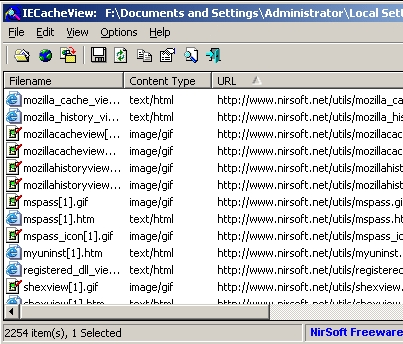


Download IECacheView 1.31 (46 KB).

MozillaCacheView is a small utility that reads the cache folder of Firefox/Mozilla/Netscape web browsers, and displays the list of all files currently stored in the cache. For each cache file, the following information is displayed: URL, Content type, File size, Last modified time, Last fetched time, Expiration time, Fetch count, Server name, and more. This utility works on Win 98/2000/XP/Vista and Windows 7. You can use this utility even if Firefox is not installed on your system, as long as you know the path of the cache folder that you want to inspect. You can easily select one or more items from the cache list, and then save them into another folder. You can do this by using the 'Copy Selected Cache Files To' option (F4).
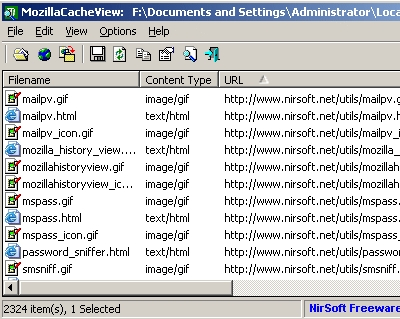


Download MozillaCacheView 1.27 (59 KB).

VideoCacheView too is a tiny utility for saving video files from web browser cache. After watching a video on a Web site, you may want to save the video file into your local disk for playing it offline in the future. It automatically scans the entire cache of Internet Explorer and Firefox (also supports Opera and Chrome) and finds all video files that are currently stored in it. If you have a FLV player that is configured to play flv files, it allows you to play the video directly from your browser's cache. After the video list is displayed, you may copy the video files from the cache into another folder. You can do that by using the 'Copy Selected Files To' option (F7). This utility is best for saving videos (flv files) from youtube.com and also mp3 files. However, as of now, it does not support wma files.
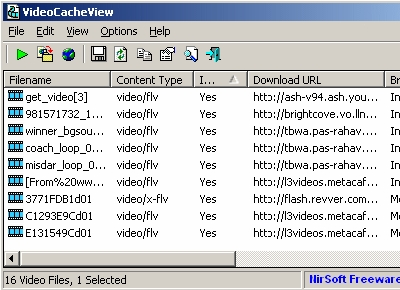


Download VideoCacheView 1.53 (68 KB).

Was this article useful? Post a review.

Sunday, June 21, 2009

I had a fit last week

I had a fit last week. Not the type when you froth at the mouth, face twitching, eyes rolling skywards and finally, you drop down dead on the floor ..with a thud. Mine was different. I chanced upon a website called suhanegeet.com. What I saw there was amazing stuff. Vintage hindi film songs from 1930 onwards. I am not a big follower of hindi film songs really, but I love collecting artifacts of antique value, be it coins, paintings, or any old titbit piece of art for that matter.


Achhut Kanya (1936) - Ashok Kumar & Devika Rani :  (Download)


To me the glorious black and white era of hindi films ended with the release of Mughal-e-Azam in 1959 (or was it 1960 ?). This was the period which saw the evolution of hindi film songs from the unbearably harsh sounding songs of the early 1930s to the refined voices of singers like K L Saigal, Amirbai Karnataki, Zohrabai Ambalawali, C H Atma, Talat Mahmood, Suraiya, Khursheed, Shamshad Begum, Noor Jehan and many others. The emergence of Lata Mangeshkar and company in the late 1940s however, changed the face of hindi film music forever.


Mughal-e-Azam (1959) - Lata & Shamshad Begum :  (Download)


So I went down to work. Suhanegeet.com is not a fanciful site, infact it is a bit drag on at first look. It has a great search engine though. Above all, it has an archive of some 8000 songs, but I was interested only in songs of the 1930s, 1940s and 1950s. The songs can be played on an onsite flash mp3 player but cannot be downloaded. I somehow managed to download 'quite a few' songs, all of them from the above mentioned period. I have this strange thing going for me. When I get down to do something, I try very hard to be meticulous about it.

I had a fit last week :


Thirsting for more of such vintage songs, I discovered another site : ansarimusic.net (or songs420.com). Applying the same 'method' which I did with suhanegeet.com, I downloaded 'some' of the songs, mostly of the legendary singers. I finished the job by downloading a 'few' from smashits.com, most of them from the 1930 through the 1950s. Finally, I have a handsome collection of select old hindi film songs now, all vintage. All this took me a few hours of nosing around ..and a little application of mind.

Comments are welcome.

Sunday, March 22, 2009

How to Download from pz10.com

Yet another very good, but not very popular resource of hindustani classical music is pz10.com (the pz stands for Punjabi Zone). The reason it being not too well known in the classical music circuit is, it's rather unfriendly interface and strange indexing system. But, once you get the real feel of the site it could prove to be a true bonanza to all music lovers. One good thing about this site is that it streams it's music in both .wma and .mp3 formats. Moreover, the mp3s are of 128 Kbps (near CD) quality, which is good enough reason to download from this site.


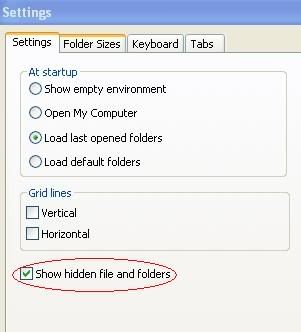
To music lovers for whom retrieving music from the Internet Explorer Cache is becoming a habit, I recommend they install ExploreXP (click here to download), a very small and free alternative to Windows Explorer which is easy to setup and can be configured to view all hidden and system files. Moreover it lets you view the filesize in Bytes rather than KBs which is the standard view in Windows Explorer.

ExploreXP settings :


Before attempting to download, clean your Internet Explorer cache completely, by either using the standard method of Start > Programs > Accessories > System Tools > Disk Cleanup, or by using an utility like CCleaner or even Index.bat (a batch code written by me for those who know their way around with the Command Prompt and Safe Booting).

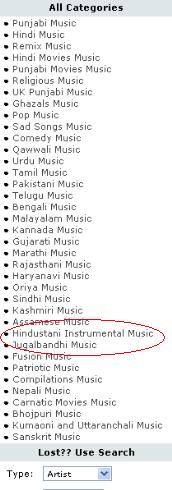
Visit the music section of pz10.com. Click on the Hindustani Instrumental Music (its more than just instrumental really), and then on the View / Browse All Hindustani Instrumental Music Albums (or simply click here).


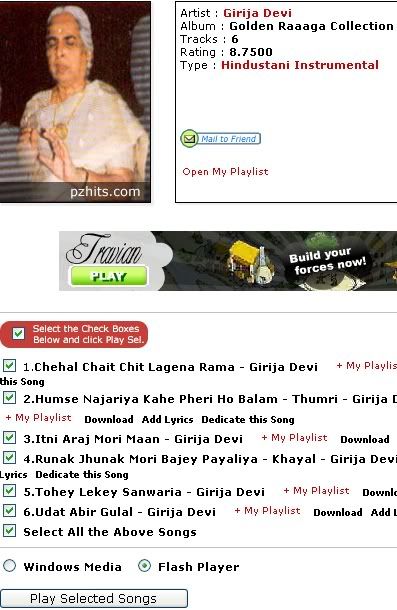
Choose the album you want to download.


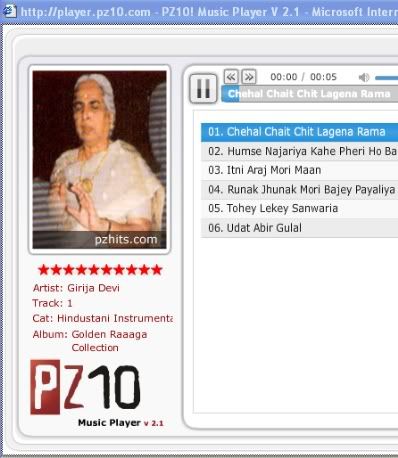
Choose Flash Player, Select All Songs and click on the Play button. Let the songs play to their full length.


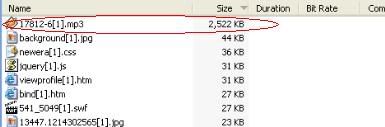
Inside the IE Cache, the song file will start to grow as it plays on :


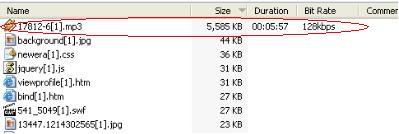
After the caching is complete :


Retrieve the songs from the Internet Explorer Cache. ExploreXP will help you to do it with ease.

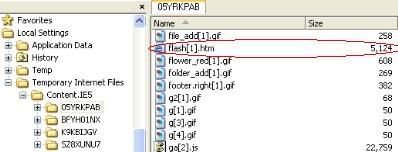
Another way to download is to search for flash[1].htm file in the cache which is the playlist file (this is tricky because sometimes it could be a jumbled 8 character name like CAX8KNTH.htm). If you are using the Windows Media Player as your player option, the playlist file will be named playlist[1].htm.


Open the file in notepad and copy the song URL (highlighted part) which looks like this :

[http://media.cdn.pz10.com/mm6/files/40/17812/17812-1.mp3 ?voxtoken=9c7c035c20238f84ff7b85b7b882ce65d204e35f]

Use a downloader like Flashget to download the file.

Note: The voxtoken=(+ a combination of letters and numbers) is a part of secure webcasting code by Voxel meant to prevent the users from downloading the music. As the voxtoken code changes every time you load the player, so does the URL of the song, preventing people from posting the songs on their blogs or elsewhere. This means, the URL is good enough for single use only.

The pz10.com team has a sense of humor too. An attempt to open the flash.asx (seemingly a playlist file, the path is mentioned in flash[1].htm), will give you this mocking message :

NO SOUP FOR YOU SHAME SHAME!!!!

Well, here is a spoonful, (of soup ?) for everyone to savour.

Girija Devi - Humse Najariya Kahe Pheri - Thumri :  (Download)


Apart from a sizeable collection of hindustani classical music, pz10.com also has a good number of regional songs including Bhojpuri and Rajasthani folk.

Enjoy !!

Sunday, February 08, 2009

How to Download from ITC-SRA

The origin of hindustani classical music can be traced back to Vedic times, nearly five thousand years ago. Some say its origin is far older, lost in the mists of distant times and places beyond the lives and memories of humankind.

From this obscure point of indeterminate origin, it evolved over thousands of years in temples and spiritual traditions throughout the Indian subcontinent. And many centuries ago, it moved from the temples into the palaces of the kings and queens of India, who were its most fervent and avid patrons. The stalwart kings of India have nurtured our music with tender care and have been its willing captives. In fact, musical training formed an indispensable item of royal education. Nowhere else in the world has royal patronage and encouragement to music probably been as continuous and rich as in India.


After India's independence, the loss of royal patronage threw the arts open to public mercy. Hindustani classical music, in its pure form, is fundamentally a complex study and therefore, cannot come within the reach of the uninitiated. As a result, serious music suffered. During the mid-seventies, ITC's top management envisioned that the Company (ironically, a tobacco company) could play a major role to preserve and propagate the rich Indian musical heritage.

ITC-SRA (ITC Sangeet Research Academy) was created in 1977 as an independent Trust. In creating ITC-SRA, ITC's farsighted endeavour was to establish a modern 'Gurukul' and revive the traditional 'Guru-Shishya Parampara'. Corporate patronage of music on this scale was unknown before. It's website holds a treasure, classical music that is unavailable elsewhere, recordings that are exclusive and rare to find. You may visit the site and hear all the music to your heart's fill but you are not supposed to download it. It uses Real media for streaming music and video, hence files are playable only if you have Real Player installed in your system.

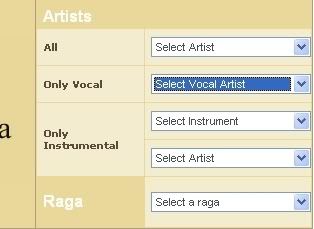
But for obstinate people like many of us, there is a way to download music from ITC-SRA too. First of all you must have a downloader installed. I use Flashget (I recommend Flashget Classic version 1.73), but Orbit downloader and for that matter any downloader that supports rtsp (Real Time Streaming Protocol) will do. Once the downloader is installed, open it and visit the ITC-SRA site (or click here). Click on the Raga Online option (see image) or straightaway click here :


Choose your desired artist from the dropdown menu :


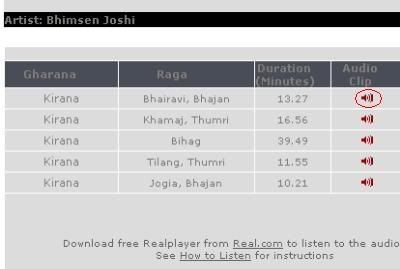
A list of songs available on the site will appear :


Right click the small speaker icons and save the file by choosing 'Save Target As...'. But hold on, this is not the actual music file but just a playlist and could be as small as just 1 Kb (e.g. bhimsenjoshi_bhairavi.ram for the encircled song). Open the file in any text editor (notepad will do) and you will be able to see it's content, a single line with commands for your Real Player :


rtsp://202.138.97.7:554/~itc/audio/kirana/bhimsenjoshi_bhairavi.rm ?cloakport=80,554,7070

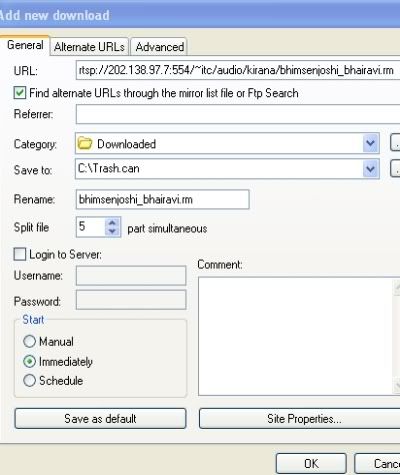
Copy the highlighted part (leave the ? and the part after it). Paste the link in the downloader's URL window (if the URL snatcher is on, it will paste the URL automatically). This is what it looks like in Flashget :


Click OK and your file will begin to download :


The files are Real Media files with a .rm extension and can be played with Real Player or any other player that supports this format.

You may convert .rm files into .mp3 if you wish. I use Super for most of my converting jobs.

Listen to two songs from the above list, downloaded in similar fashion, converted to mp3 files, uploaded and posted here for your listening pleasure ( now, who says I am not doing the hard work...and making your lives easier ?? ) :

Bhimsen Joshi - Bhairavi (Jo Bhaje Hari Ko Sada) :  (Download)


Bhimsen Joshi - Khamaj Thumri (Jadu Bhareli) :  (Download)


Comments are welcome.

Enjoy !!

Tuesday, September 16, 2008

How to Download from imeem.com

Imeem.com is one of the more popular sites among the music communities. One unique thing about imeem.com is that it converts all its .mp3 uploads into .flv format (flash video format minus the video) for streaming purpose.


It does another thing to the files : it gives them unusually long names and an extension that confuses the person who is figuring out a way to download a music file. In the Internet Explorer Cache the files are seen as .gif files which normally are graphic images. The long names allotted to the files is probably to prevent the users from copying the files from the Internet Explorer Cache. A typical Imeem song has a name like this :

jnqaSyDSXHO13HPqVv...YsqZOQR3BtEZZ3TMO_pj6s9w.gif

With almost 200 or so more alpha-numeric characters in place of ... and in between.

Now a file name as long as this (it may even extend beyond your computer screen) usually freezes your computer when right clicked with the mouse (in your attempt to copy it) resulting into a system crash or forcing you to close the Windows Explorer. In other words downloading music from imeem.com is banned officially (or at a price).

So how to download from imeem.com ?? Follow some simple steps and you may be able to download from imeem.com :

As usual clean your Internet Explorer Cache thoroughly. For a detailed description of how to clean your Internet Explorer Cache read my previous post How to Download from musicindiaonline.com. Apart from the routine Start > Programs > Accessories > System Tools > Disk Cleanup, I would highly recommend to delete the mysterious index.dat files as well. Index.dat files are not easy to delete when Windows is running, and you will need a special tool for this. The best tool that is easily available and most importantly, a freeware is CCleaner (formerly known as Crap Cleaner).


A portable version of CCleaner is highly recommended which will spare you from the installation process. If you are comfortable enough with booting up your system into Safe Mode, then I have a little surprise for you : a nifty utility (only 3 KB) that I have devised for my personal use and which I am willing to share. Find the link in the sidebar of this blog or click here. Go through the Readme.txt file before using it.


Once the index.dat files are gotten rid of you are left with only 4 sub folders in the Temporary Internet Files folder making it easier to find the music files.

Now go to Imeem.com and start playing the file that you want to download. At the same time go to Start > Programs > Accessories > System Tools > Disk Cleanup. Click on the View Files button on the next window. You will find the file in one of the 4 folders, growing in size as it plays on.
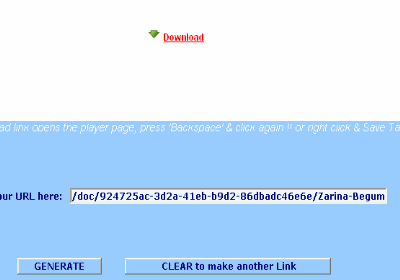


Once it has played its full length or when it stops growing in size and has buffered fully, you may rename the file by a 'delayed' double-click of the mouse (do not right click as it may freeze your computer), to a short name of your choice (e.g myfile.flv) with the .gif replaced with .flv as it's extension.


Copy (or Cut and Paste) the file in the folder of your choice and play it in a Flv Player. You may convert this file into a mp3 file if you wish using a file converter. I use SUPER for most of my converting jobs.

Enjoy !!

Tuesday, July 08, 2008

How to Download from Smashits.com


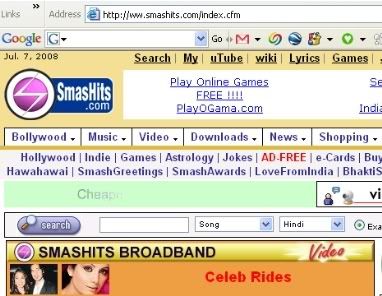
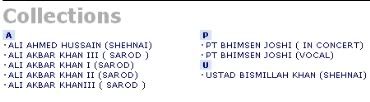
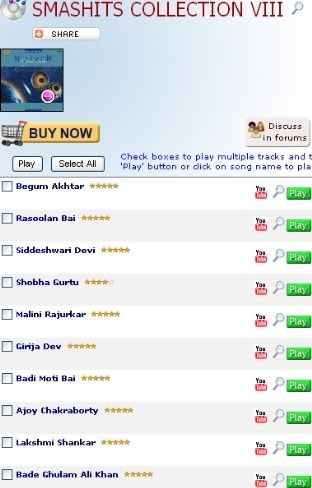
I wonder how many Indian Classical Music enthusiasts know that ww.smashits.com (note the ww instead of www) has a few gems of hindustani classical music stored in it's seemingly bollywood centric server. This portal is not very new and does not boast of a large classical music content but still I managed to download a few pieces of music not available anywhere else. My favourites are about 75-80 songs featured in it's 'Smashits Collection' (8 CDs). These are now an important part of my 'indianraga.collection'.

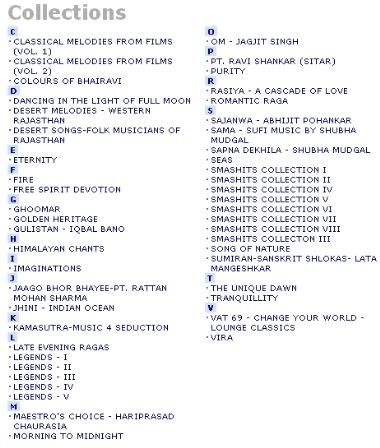
See the screenshot of the classical music collection in the category 'Classical' :


And the collection in the category 'North Indian Classical' :


However there is a catch. There is no way you can download a music file directly from this site (sorry, there is one but only by making a small payment). But for mortals like yours truly, who are forever downloading music and would go bankrupt in a few weeks if they continue paying for it, there is always a way out.

But first things first. I would like you folks to go through my earlier post :

How to Download from musicindiaonline.com

As we are going to retrieve the music files from the 'Internet Explorer Cache' it is essential to clean it completely before going further. Firefox users will not be able to download using this method. There are a few tricks for diehard Firefox fans too, but let's leave them for another time.

After you have cleaned your Internet Explorer Cache, follow the steps mentioned in the post : How to Download from musicindiaonline.com to view your downloading files.

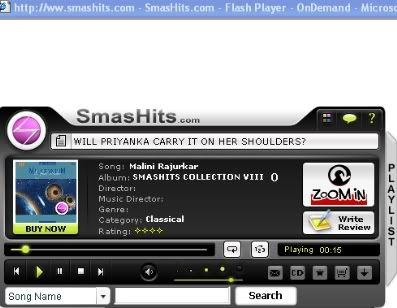
Now unlike musicindiaonline.com which streams it's music in Real Audio (.ra) or Windows Media Audio (.wma) format, smashits.com uses a Flash Player and streams it's music in .mp3 format (usually 64 kbps) which is a big plus for those who want to download from this site. Moreover the sound quality of the files is much better than that on musicindiaonline.com (20-24 kbps).

Click on the album you want to download and select the files (you may select all, if you want).


Click on the 'Play' button. The Flash Player will open as a pop-up.


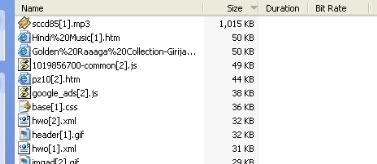
Open the Internet Cache folder and you will be able to view your file gradually growing in size as it plays on.


Let it buffer fully (you will see the 'Bit Rate' and 'Duration' of the file appear when it does). You don't need to play the file to it's full length but letting it buffer fully is very important.


Copy the file and paste it in the folder of your choice, rename it according to it's original name and repeat the procedure to download another file. On a fast Broadband connection you may be able to download an album (5-6 songs) in 4-5 minutes.

Watch out for more downloading tips from other music streaming sites in my future posts.

Download and Enjoy Listening !!

Friday, April 18, 2008

How to Download from musicindiaonline.com

Almost everyone who has anything to do with music, both 'hindustani classical' and 'popular' must surely have visited www.musicindiaonline.com more than a few times. This site claims itself to be the largest Indian music resource on the internet. True of course, be it hindustani classical, indipop, bollywood, fusion or regional folk, you name it and it's all there on this site.

The difference between this site and other file hosting sites is very basic. Whereas musicindiaonline.com has it's own files on it's servers and has full control over the streaming quality of the music and also what files to put or remove, other sites like mediafire.com, eSnips.com, 4shared.com and the rest have no such control.

Many of us must have encountered a much wanted song on musicindiaonline.com and wished fervently that there had been a download button on this site. Alas, there is none and no trick such as changing the URL (a'la eSnips) work here.

But for few of us who desperately want a particular music file and are ready to spend a little time, there's a way out : a simple method by which you can download a file or even multiple files in one go.

Just follow a few simple steps. Remember this trick will work with Internet Explorer only.

Go to the Start Menu > Programs > Accessories > System Tools > Disk Cleanup. Clean all the mess that has been accumulating in the browser's cache. Once the cache is empty you may go to the musicindiaonline.com site and search for your favourite song or album just as shown in the figure below.


Select the songs to be downloaded by ticking them or if you want them all, tick 'Select All'.


Click the 'Play Selected Songs' button. If you have not been to this site recently it will ask you to choose between Real Player and Windows Media Player. Select Windows Media Player as in the pic below :


The player will open up and your playlist will begin to play.


As the file is playing repeat Step 1 (i.e Disk Cleanup). But this time don't clear the cache but click on the 'View Files' option :


This will open a directory of Internet Cache folders as seen below :


Explore each folder (if you have cleaned your Internet Explorer Cache thoroughly, there should be four of them). You will find your playing file in one of the folders, growing by size as it plays on. Wait for the 'Duration' and 'Bit Rate' details to appear and click on the 'Play Next' button of the player to start playing the next song in the playlist.


You may now Copy or Cut & Paste the previous file to a folder of your choice. The files are in .wma format. Keep on exploring all the folders as the second file plays on and you will find it in one of the folders. Repeat the process.

You need not play each song to it's full length. On a fast internet connection a 15 minute song may buffer fully in a couple of minutes. But it's important that you wait for the 'Duration' and 'Bit Rate' details to appear before copying (or cut & paste) the file.

Keeping in mind that musicindiaonline.com has music streaming at a very low bitrate (20-24 kbps) an album consisting of 6-7 songs may be downloaded in 4 to 5 minutes.

Saturday, March 29, 2008

eSnips : Anonymous Downloading

Now that eSnips keeps on evolving new methods to prevent users from downloading, users' frustration is surmounting with each day.

A few days back they changed their default music player and when I made small modifications to my eSnips Downloader it stopped working with Firefox. Internet Explorer users were spared though.

As I am trying to keep pace with eSnips with every step they take, I have tried yet again to modify the code of the Downloader.

This time it would be anonymous downloading through a proxy server. This is not a permanent solution though but as I said before, I am keeping pace with eSnips everday and every time.

Some self explanatory screenshots of the all new eSnips Downloader (Link Generator) :

With Internet Explorer :

Step One : Generate your link as before and click on the generated link.


Step Two : Depending upon the security settings of Internet Explorer - it's a small piece of caution that you are about to download a file from some alien territory - right click on the message below the title bar of the Downloader and choose 'download file', or you may click the bold orange coloured link itself in the main window.


Step Three : Save your file.


With Firefox it's lot easier. The first and the third steps are the same as in Internet Explorer. There is no warning of downloading an unkown file.


I am not very sure if this will work forever. Why, it may stop working a few hours from now.

P.S : I have not tried it, but this new code could byepass the bandwidth problem too. Now, this surely means being 'eSnips-eccentric'...

Enjoy the moment !!

Tuesday, March 18, 2008

New !! eSnips Downloader for Dummies

As eSnips has changed it's default music player from windows media player to a flash player, old download tricks have stopped working.

Although the doc to nsdoc trick still works with downloaders like Flashget and Orbit (Grab++), it isn't working when the URL is changed in the address bar of the browser itself and by pressing Enter. Only a blank page will appear when done so.

To let users continue downloading from eSnips without taking the pains of modifying each URL, I have rewritten the code of the eSnips Downloader (Link Generator). Find the link in the sidebar. It allows you to download as before. You can click on the generated link, or if you like, save the file by right clicking the link and save target as...

But the bandwidth problem still persists. eSnips is not the same place as it used to be before. As for me, I have stopped uploading more to my music folders.

Meanwhile continue downloading files from accounts that have no bandwidth problems (those with less visitors).

Enjoy !!

Thursday, February 28, 2008

This file is no longer available on eSnips!

These days eSnips seems to be getting paranoid about letting users to both upload and download music files (mp3 in particular, as other formats are still left untouched). Everytime you attempt to play a music file you more often than not, will get a message :

Maximum daily bandwidth exceeded

The maximum daily bandwidth for this account has been reached. Please try to download this file another day.

Thank you,
The eSnips Team.


The next day you will probably see the same message (I've been trying to download a file from an user's folder for the last ten days and getting this same message again and again and everyday). I have not been able to find a way out for this problem till today.... but I'm trying.

When you try to upload a music file (try recording a sound file of your own voice and uploading it) you invariably will be refused to upload it (publish it, as people at eSnips call it) citing copyright infringement laws, but only when the file has almost uploaded fully and not at the beginning when the upload starts.

This could be very frustrating for many of us. Imagine an user uploading a 50 MB file and tearing his hair when he gets this message, only after the upload is almost done. However, there are ways to circumvent these glitches as eSnips is presumably using a software called 'Audible Magic' which scans each music file for copyright fingerprints. However, even my not-so-techy mind knows, these fingerprints are embedded in the mp3 file in the form of ID3 tags either in beginning of the file or at the end of it. Try trimming the mp3 a few seconds at the beginning and a couple of seconds at the end, and if luck is on your side you may probably hoodwink the software in letting you upload.

Recently I was searching a Ravi Shankar file at eSnips and I got as far as finding the file with all the details of it (file size, no. of views and all) intact :


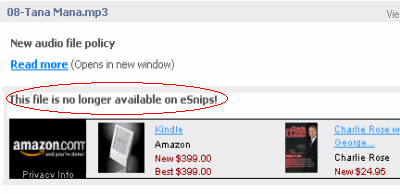
But on attempting to play the file I got this :

This file is no longer available on eSnips!


Well, my abnormally inquisitive mind told me that the file was there at eSnips allright, as even the file size was showing, so I just modified the 'doc' to 'nsdoc' in the address bar and pressed 'Enter'. Lo and behold my file was ready for download.


I am sure something is bugging eSnips which I fail to understand (maybe copyright authorities have tightened their noose around it). But why employ such methods to block files, which are so easy to exploit.

Meanwhile happy downloading !!

Sunday, December 30, 2007

eSnips Downloader for Dummies

Problems galore persist at eSnips. The whole of December has passed away with users facing one problem or the other, many facing the dilemma of whether to move away from eSnips and search for greener pastures. A recent happening at eSnips : users' files are dying a slow death the 'poison' still being unknown. Everyday friends at eSnips are reporting that files are being removed or blocked indiscriminately without any logic or reason given.

Suppose I have uploaded a full album of an artist, I find only a couple of the songs being removed or blocked, whereas others are playing as before. So there are are no copyright issues I suppose. eSnips should inform individuals and point out the files which are a cause of concern to them. Let users remove the files themselves or take the risk of their accounts being banned or cancelled.

One more discovery I have made (eSnips is proving itself to be an interesting maze puzzle, at the cost of being laughed at later on), if your file is still showing in your folders and only gives an error when you attempt to play it, you can still salvage it. Just move such files to any of your private folders and you will find that they are still there, playing as before but better be quick in doing this and don't share them for the time being.

I for myself am worried because my music files belong to a dying genre of music and is going through a 'renaissance' period. Today's younger generation is being drawn towards it after a gap of almost 50 years. The whole of 60's, 70's, 80's and 90's were the decades when Hindi film music ruled the roost and hindustani classical music was a word alien to the younger generation. Some of the artists which I have featured are no more in this world and let me say no longer remembered (no copyright issues here atleast). Many others are very young and are quite happy to find their music doing the rounds on the internet. In fact some of them have even contacted me personally and showed their pleasure after knowing that their music is being lapped up (read loved) by the new generation of hindustani classical music lovers.

Now a little about my eSnips Downloader. It's been there all along since 15th of December in the links section of the sidebar of this blog, (must admit I spent quite a few sleepless nights until I finished upon it... ) but many of my visitors failed to notice it and continued to pay their attention only on the tips & tricks of downloading at eSnips. This eSnips Downloader is the easiest thing to use...no install required or anything of that sort. Just a click of the mouse and you are done. As I am not a techie or a software professional I have tried my best to make it simple and easy to use. A few of you who have been complaining their music opening up in a player instead of dowloading will find this very useful because I have added an extra piece of code forcing the file to download and not play.
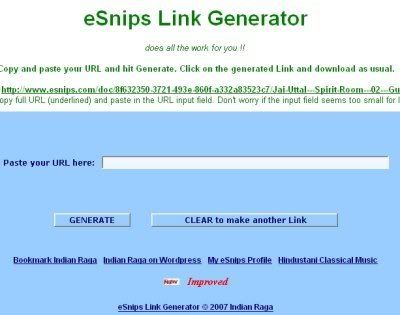
I admit, I am a very laid back person and have not done much effort to publicise it. See some screenshots of the eSnips Downloader at work :

Before :


And after the download link is generated :


I hope all of you who find this useful will continue appreciating my efforts (please keep in mind that I have very limited knowledge of software, HTML or javascript).

A very happy New Year to all of you. Enjoy !!