Carnatic music lovers must surely have visited http://www.sangeethapriya.org/, one of the biggest archives of Carnatic music concert recordings. This is an exclusive website of classical music 'rasikas', maintained and run by them purely to share the 'live concert' recordings owned by them with other 'rasikas'. Commercial (studio) recordings are not permitted on this site.
Some of the members here have uploaded many recordings of 'hindustani classical music' too.
Two of my favorites are :
HMG Murthy's folders :
http://www.sangeethamshare.org/murthy/
You will find very good recordings of Ajoy Chakrabarty, Rashid Khan, Parween Sultana and many more in live concert here.
Another one is :
Raju Asokan's folders :
http://www.sangeethamshare.org/asokan/
This one has an exclusive folder for hindustani classical music and is more elaborate in it's listing. You will find most of the 'Gharanas' featured here. This one will keep you busy downloading for quite sometime. Again a big respite from eSnips. You will miss the 'details' feature of eSnips though, as none of the files have description and are listed ftp style. You could be spending much of your time in figuring out what to find where.
Thursday, April 17, 2008

Tuesday, April 15, 2008
Classical Music : secret treasure troves
For those of you who are thinking of having a Hindustani Classical Music collection of their own, here are a few very good links to start with :
Dr. Ashfaq Ali Khan's collection on mediafire.com :
Great collection, very rarely found private recordings included. My favorites are the Patiala-Kasur and Sham-Chaurasi Gharana folders. If deleted these files will be hard to find on the web, in the future. All classical music lovers, me included will always be indebted to Khan Sahab's generosity in sharing them with the world. He belongs to a now very rare to find, almost instinct species of genuine 'Rasikas' of hindustani classical music. An effort of a lifetime. As he has very aptly mentioned somewhere : 'Loot Sake To Loot' :
http://www.mediafire.com/?sharekey=2c219c6849e709688c9e7c56ba37815fda4affcb325a516f
Another big resource of classical music on mediafire.com is karkenhalli's collecton:
http://www.mediafire.com/?sharekey=c7708562ab6cd7cade385df5c3eff3abdb4e1311359a1f49
Patiala-Kasur followers must also visit this link, an exclusive collection of the Gharana :
http://www.mediafire.com/?sharekey=edced5e6b67995428c9e7c56ba37815f746671ff324c3b32
Raj Tendulkar's collection :
http://www.mediafire.com/?sharekey=fccd1065ca4a595b91b20cc0d07ba4d202addd4f5dffaa4e
More 'non-eSnips' links will be posted soon.
Dr. Ashfaq Ali Khan's collection on mediafire.com :
Great collection, very rarely found private recordings included. My favorites are the Patiala-Kasur and Sham-Chaurasi Gharana folders. If deleted these files will be hard to find on the web, in the future. All classical music lovers, me included will always be indebted to Khan Sahab's generosity in sharing them with the world. He belongs to a now very rare to find, almost instinct species of genuine 'Rasikas' of hindustani classical music. An effort of a lifetime. As he has very aptly mentioned somewhere : 'Loot Sake To Loot' :
http://www.mediafire.com/?sharekey=2c219c6849e709688c9e7c56ba37815fda4affcb325a516f
Another big resource of classical music on mediafire.com is karkenhalli's collecton:
http://www.mediafire.com/?sharekey=c7708562ab6cd7cade385df5c3eff3abdb4e1311359a1f49
Patiala-Kasur followers must also visit this link, an exclusive collection of the Gharana :
http://www.mediafire.com/?sharekey=edced5e6b67995428c9e7c56ba37815f746671ff324c3b32
Raj Tendulkar's collection :
http://www.mediafire.com/?sharekey=fccd1065ca4a595b91b20cc0d07ba4d202addd4f5dffaa4e
More 'non-eSnips' links will be posted soon.
Saturday, March 29, 2008
eSnips : Anonymous Downloading
Now that eSnips keeps on evolving new methods to prevent users from downloading, users' frustration is surmounting with each day.
A few days back they changed their default music player and when I made small modifications to my eSnips Downloader it stopped working with Firefox. Internet Explorer users were spared though.
As I am trying to keep pace with eSnips with every step they take, I have tried yet again to modify the code of the Downloader.
This time it would be anonymous downloading through a proxy server. This is not a permanent solution though but as I said before, I am keeping pace with eSnips everday and every time.
Some self explanatory screenshots of the all new eSnips Downloader (Link Generator) :
With Internet Explorer :
Step One : Generate your link as before and click on the generated link.

Step Two : Depending upon the security settings of Internet Explorer - it's a small piece of caution that you are about to download a file from some alien territory - right click on the message below the title bar of the Downloader and choose 'download file', or you may click the bold orange coloured link itself in the main window.

Step Three : Save your file.

With Firefox it's lot easier. The first and the third steps are the same as in Internet Explorer. There is no warning of downloading an unkown file.

I am not very sure if this will work forever. Why, it may stop working a few hours from now.
P.S : I have not tried it, but this new code could byepass the bandwidth problem too. Now, this surely means being 'eSnips-eccentric'...
Enjoy the moment !!
A few days back they changed their default music player and when I made small modifications to my eSnips Downloader it stopped working with Firefox. Internet Explorer users were spared though.
As I am trying to keep pace with eSnips with every step they take, I have tried yet again to modify the code of the Downloader.
This time it would be anonymous downloading through a proxy server. This is not a permanent solution though but as I said before, I am keeping pace with eSnips everday and every time.
Some self explanatory screenshots of the all new eSnips Downloader (Link Generator) :
With Internet Explorer :
Step One : Generate your link as before and click on the generated link.
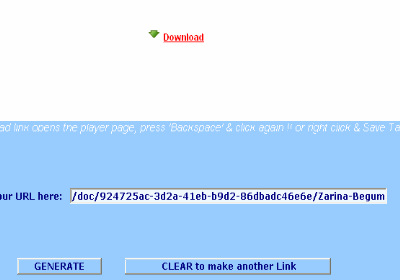
Step Two : Depending upon the security settings of Internet Explorer - it's a small piece of caution that you are about to download a file from some alien territory - right click on the message below the title bar of the Downloader and choose 'download file', or you may click the bold orange coloured link itself in the main window.
Step Three : Save your file.
With Firefox it's lot easier. The first and the third steps are the same as in Internet Explorer. There is no warning of downloading an unkown file.
I am not very sure if this will work forever. Why, it may stop working a few hours from now.
P.S : I have not tried it, but this new code could byepass the bandwidth problem too. Now, this surely means being 'eSnips-eccentric'...
Enjoy the moment !!
Tuesday, March 18, 2008
New !! eSnips Downloader for Dummies
As eSnips has changed it's default music player from windows media player to a flash player, old download tricks have stopped working.
Although the doc to nsdoc trick still works with downloaders like Flashget and Orbit (Grab++), it isn't working when the URL is changed in the address bar of the browser itself and by pressing Enter. Only a blank page will appear when done so.
To let users continue downloading from eSnips without taking the pains of modifying each URL, I have rewritten the code of the eSnips Downloader (Link Generator). Find the link in the sidebar. It allows you to download as before. You can click on the generated link, or if you like, save the file by right clicking the link and save target as...
But the bandwidth problem still persists. eSnips is not the same place as it used to be before. As for me, I have stopped uploading more to my music folders.
Meanwhile continue downloading files from accounts that have no bandwidth problems (those with less visitors).
Enjoy !!
Although the doc to nsdoc trick still works with downloaders like Flashget and Orbit (Grab++), it isn't working when the URL is changed in the address bar of the browser itself and by pressing Enter. Only a blank page will appear when done so.
To let users continue downloading from eSnips without taking the pains of modifying each URL, I have rewritten the code of the eSnips Downloader (Link Generator). Find the link in the sidebar. It allows you to download as before. You can click on the generated link, or if you like, save the file by right clicking the link and save target as...
But the bandwidth problem still persists. eSnips is not the same place as it used to be before. As for me, I have stopped uploading more to my music folders.
Meanwhile continue downloading files from accounts that have no bandwidth problems (those with less visitors).
Enjoy !!
Thursday, February 28, 2008
This file is no longer available on eSnips!
These days eSnips seems to be getting paranoid about letting users to both upload and download music files (mp3 in particular, as other formats are still left untouched). Everytime you attempt to play a music file you more often than not, will get a message :
Maximum daily bandwidth exceeded
The maximum daily bandwidth for this account has been reached. Please try to download this file another day.
Thank you,
The eSnips Team.
The next day you will probably see the same message (I've been trying to download a file from an user's folder for the last ten days and getting this same message again and again and everyday). I have not been able to find a way out for this problem till today.... but I'm trying.
When you try to upload a music file (try recording a sound file of your own voice and uploading it) you invariably will be refused to upload it (publish it, as people at eSnips call it) citing copyright infringement laws, but only when the file has almost uploaded fully and not at the beginning when the upload starts.
This could be very frustrating for many of us. Imagine an user uploading a 50 MB file and tearing his hair when he gets this message, only after the upload is almost done. However, there are ways to circumvent these glitches as eSnips is presumably using a software called 'Audible Magic' which scans each music file for copyright fingerprints. However, even my not-so-techy mind knows, these fingerprints are embedded in the mp3 file in the form of ID3 tags either in beginning of the file or at the end of it. Try trimming the mp3 a few seconds at the beginning and a couple of seconds at the end, and if luck is on your side you may probably hoodwink the software in letting you upload.
Recently I was searching a Ravi Shankar file at eSnips and I got as far as finding the file with all the details of it (file size, no. of views and all) intact :

But on attempting to play the file I got this :
This file is no longer available on eSnips!

Well, my abnormally inquisitive mind told me that the file was there at eSnips allright, as even the file size was showing, so I just modified the 'doc' to 'nsdoc' in the address bar and pressed 'Enter'. Lo and behold my file was ready for download.

I am sure something is bugging eSnips which I fail to understand (maybe copyright authorities have tightened their noose around it). But why employ such methods to block files, which are so easy to exploit.
Meanwhile happy downloading !!
Maximum daily bandwidth exceeded
The maximum daily bandwidth for this account has been reached. Please try to download this file another day.
Thank you,
The eSnips Team.
The next day you will probably see the same message (I've been trying to download a file from an user's folder for the last ten days and getting this same message again and again and everyday). I have not been able to find a way out for this problem till today.... but I'm trying.
When you try to upload a music file (try recording a sound file of your own voice and uploading it) you invariably will be refused to upload it (publish it, as people at eSnips call it) citing copyright infringement laws, but only when the file has almost uploaded fully and not at the beginning when the upload starts.
This could be very frustrating for many of us. Imagine an user uploading a 50 MB file and tearing his hair when he gets this message, only after the upload is almost done. However, there are ways to circumvent these glitches as eSnips is presumably using a software called 'Audible Magic' which scans each music file for copyright fingerprints. However, even my not-so-techy mind knows, these fingerprints are embedded in the mp3 file in the form of ID3 tags either in beginning of the file or at the end of it. Try trimming the mp3 a few seconds at the beginning and a couple of seconds at the end, and if luck is on your side you may probably hoodwink the software in letting you upload.
Recently I was searching a Ravi Shankar file at eSnips and I got as far as finding the file with all the details of it (file size, no. of views and all) intact :
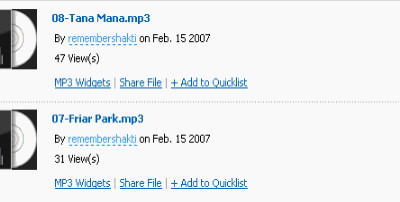
But on attempting to play the file I got this :
This file is no longer available on eSnips!
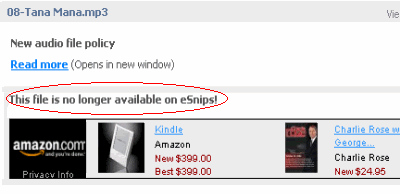
Well, my abnormally inquisitive mind told me that the file was there at eSnips allright, as even the file size was showing, so I just modified the 'doc' to 'nsdoc' in the address bar and pressed 'Enter'. Lo and behold my file was ready for download.

I am sure something is bugging eSnips which I fail to understand (maybe copyright authorities have tightened their noose around it). But why employ such methods to block files, which are so easy to exploit.
Meanwhile happy downloading !!
Subscribe to:
Posts (Atom)


